About sound card/Audio interface
THE FOCUSRITE SCARLETT 2I2,4TH GEN WITH ULTRA-LOW NOISE PREAMPS(69DB GAIN),24-BIT/192kHZ CONVERSION,HI-Z/LINE INPUTES,STUDIO-GRADE CONVERTERS,AND NEW DSP FEATURES LIKE AUDIO GAIN,CLIP SAFE AND ENHANCES AIR MODE(PRESENCE & DRIVE)FOR PROFESSIONAL RECORDING,
Reliable Performance & CompatibilityWith a class-compliant USB 2.0 interface, this audio interface works seamlessly with Windows, macOS, and Linux computers-no drivers needed. Its robust performance with a 24-bit/48 kHz sampling rate and ultra-low latency ensures accurate sound capture and real-time monitoring, perfect for both beginners and professionals.
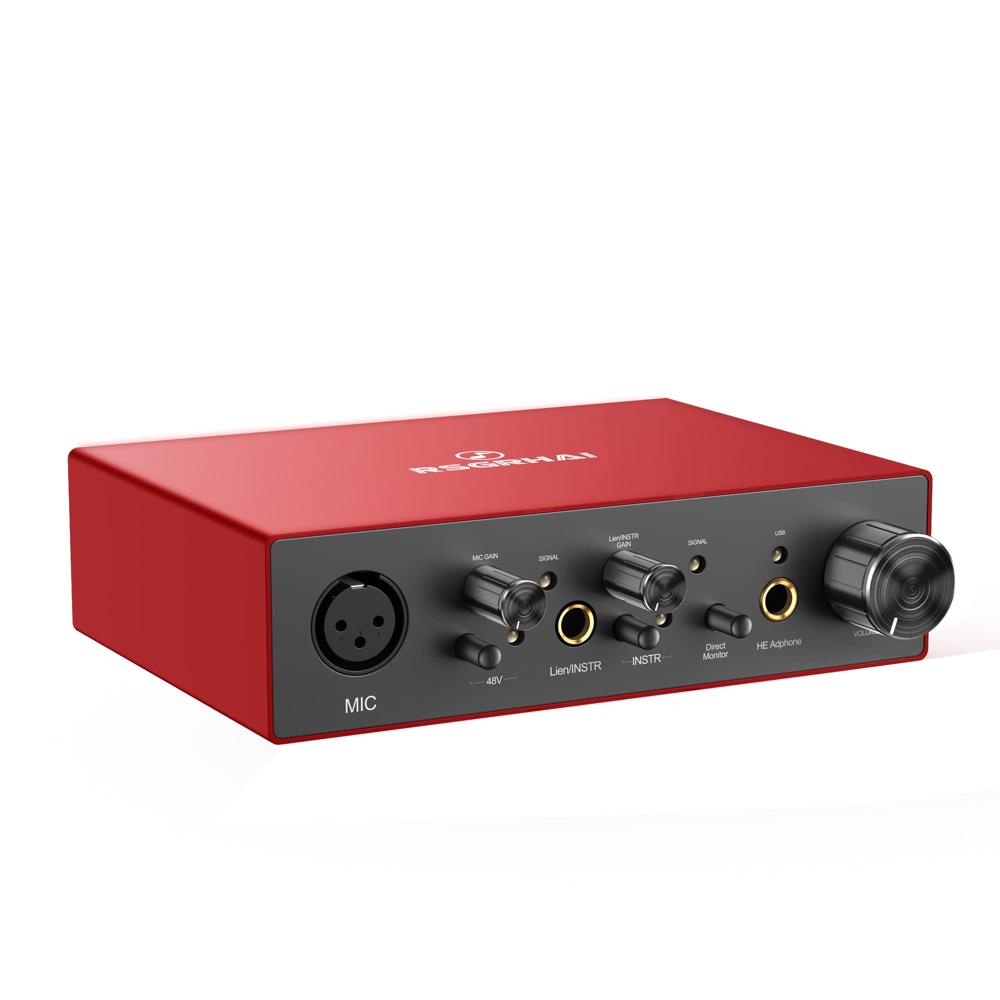
Studio-Grade Connectivity & ControlsEquipped with balanced XLR input for microphones, a 1/4" Hi-Z TS instrument input, and dedicated gain/volume controls, this device accommodates various recording scenarios. Phantom power (48V) enables high-quality condenser mic usage, while the monitor mix and mute functions facilitate precise adjustments during sessions.
Built to Last & Easy to UseThe compact, desktop-friendly metal chassis ensures lasting durability while remaining lightweight (just 0.37 kg). LED indicators provide instant status updates for power, signal, and clip, helping you avoid distortion and ensure optimal performance during all recording or playback tasks.
FAQ's of sound card/Audio interface:
Q: How do I set up this audio interface with my computer?
A: Simply connect the unit to your computer using the included USB 2.0 cable. As it is class-compliant, no additional drivers are required for Windows, macOS, or Linux. Once plugged in, your system should recognize the interface, and you can select it as your primary input/output device in your audio settings.
Q: What types of microphones and instruments can I connect?
A: You can connect condenser microphones (with 48V phantom power), dynamic microphones via the balanced XLR input, and electric guitars or instruments using the 1/4" Hi-Z TS jack. This flexibility makes it suitable for vocal, instrument, and line-level signals.
Q: When should I use the phantom power feature?
A: Activate the 48V phantom power switch only when connecting condenser microphones that require external power. Do not enable phantom power for ribbon or dynamic microphones, as they do not need it and may be damaged by the voltage.
Q: Where are the control knobs and monitoring features located?
A: All primary controls-gain, volume, monitor mix, and mute-are conveniently positioned on the interface's front panel for easy access. The headphone out is also on the front, allowing quick level adjustments and real-time listening while recording.
Q: What is the benefit of having LED indicators?
A: The LED indicators display power, signal presence, and clip status. This real-time feedback helps you monitor recording levels, prevent signal distortion, and ensure optimal performance without needing additional external meters.
Q: How does this interface ensure low noise and high-quality audio?
A: With a noise level of -90 dB, a S/N ratio of 96 dB, and harmonic distortion below 0.05%, the interface delivers clean, high-fidelity audio. Its metal chassis also helps shield against electromagnetic interference, maintaining signal integrity throughout the recording process.






 Get Latest Price


 Send Inquiry
 Send Inquiry